Tracking Welds and Skills in a CTE Welding Program
With 25 students in a booth rotation, it's hard to know who has actually mastered flat fillets and who is ready for vertical. Here's what's worth tracking, why the usual methods break down, and a sample tracking sheet you can use tomorrow.
What welding instructors usually need to track
- Every graded weld: student, date, weld type, process, position, electrode or wire, base metal and score.
- Rubric scores by criterion, not just a total, so you can see what a student keeps missing (bead consistency? starts and stops? travel angle?).
- Skill progression: which welds a student has passed, and what they're ready for next.
- Retries: how many attempts it took, and whether the second try was better.
- Projects built from prints, which don't fit a single weld score.
- Employability skills: attendance, communication, responsibility, work ethic. CTE programs are often asked to show these.
- Safety: tests passed and equipment checkoffs before students run a machine.
- Certifications and weld tests, if your program offers them.
Why spreadsheets and binders break down
Most instructors start with a spreadsheet, a clipboard or a binder of sign-off sheets. They work for a while, then:
- Scoring happens late. You see the coupon at the end of the period, or the next day, after the student has already run five more with the same mistake.
- There's no picture. A "6/9" in a cell doesn't show what the weld looked like when a parent or counselor asks.
- Data entry eats prep time. Scores get written on paper, then typed into the gradebook.
- Progression lives in your head. Remembering who has passed what, across several periods, is a lot to keep track of.
- Employability scores get skipped on busy days because they're in a separate place.
Sample weld tracking sheet
If you're tracking by hand, these columns cover what most programs need. Copy them into a spreadsheet or print this page. The sheet prints on its own, without the site menus.
| Date | Student | Weld / position | Process & electrode | Bead /9 | Cleaned /3 | Start/stop /3 | Angle /3 | Total /18 | Attempt | Next step |
|---|---|---|---|---|---|---|---|---|---|---|
| 9/15 | J. Rivera | Beads, flat | SMAW 7018 | 7 | 3 | 2 | 3 | 15 | 1 | Fillet, flat |
| 9/15 | A. Lee | Beads, flat | SMAW 7018 | 5 | 2 | 2 | 2 | 11 | 1 | Redo: speed |
| 9/16 | A. Lee | Beads, flat | SMAW 7018 | 7 | 3 | 3 | 2 | 15 | 2 | Fillet, flat |
The four criteria above (bead consistency, cleaning, starts and stops, travel angle) are a solid starting rubric for visual inspection. Swap in your own criteria if your program uses a different standard.
Tips that make tracking stick
- Score while the weld is fresh. Feedback the same period is worth far more than a grade next week.
- Keep a photo with every score. It settles disputes and builds the student's portfolio at the same time.
- Gate the next weld on the last one. For example, students must score 80% on flat beads before starting fillets. It keeps everyone working at the right level.
- Have students rate their own weld first. Comparing their rating with yours quickly shows who overrates their work and who is too hard on themselves.
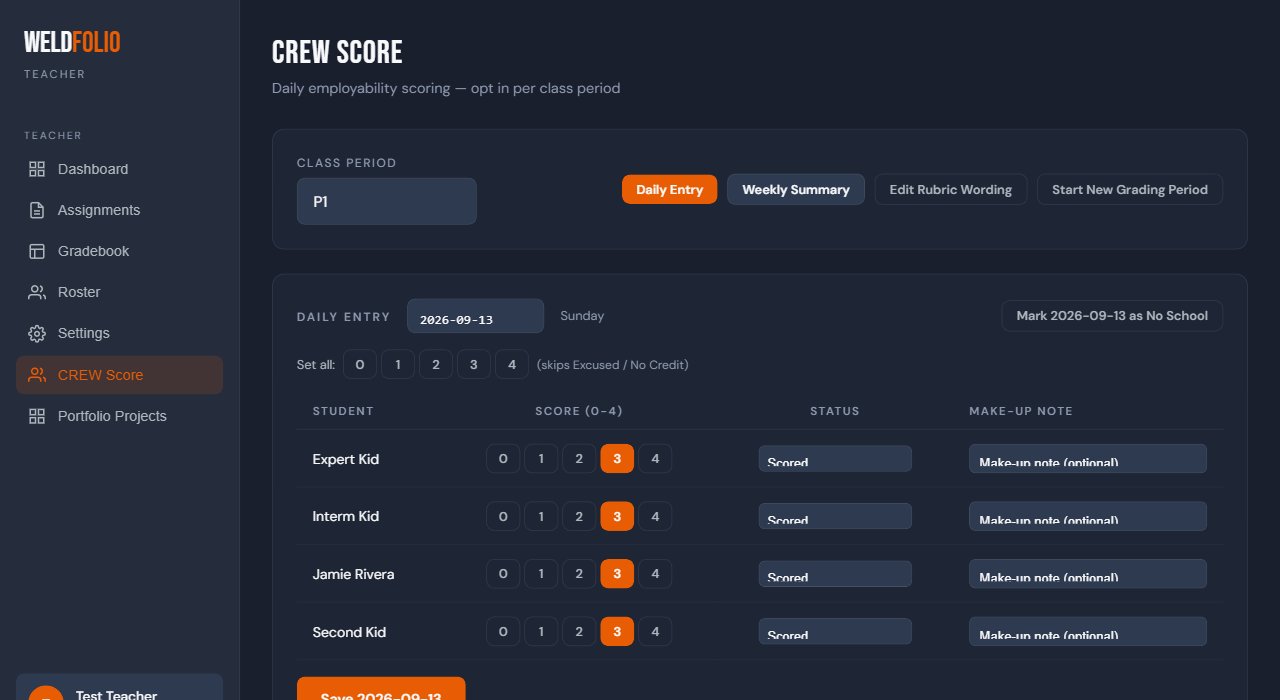
- Score employability daily, quickly. A 0–4 score per student takes a minute if most of the class earns the same score.
How WeldFolio handles this
WeldFolio was built by a welding instructor for exactly this problem. It's free for early programs, and new teachers are welcome to join.
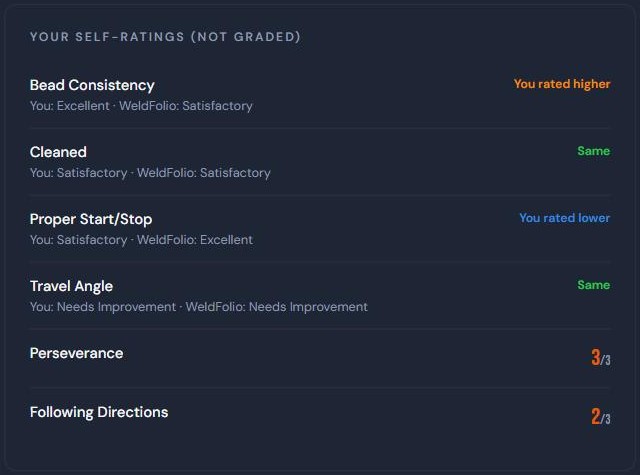
- Students submit a photo of each weld from a phone, tablet or shop webcam. WeldFolio scores it against your rubric automatically (default: bead consistency 9, cleaned 3, starts/stops 3, travel angle 3) and gives written feedback. You can override any score, or turn auto-grading off and grade it yourself.
- Self-ratings side by side. Students rate each part of their weld before submitting, and see "You rated higher," "Same" or "You rated lower" next to WeldFolio's score. Self-ratings don't affect the grade.
- Prerequisites and unlocking. Lock the fillet assignment until a student scores 80% (or any percent you choose) on beads. Students see exactly what they need to do first.
- Gradebook filtered by class, skill level or assignment, with a card view showing a whole class's welds at once. Exports to Excel.
- CREW Score: daily 0–4 scoring for Communication, Responsibility, Engagement and Work Ethic, with weekly summaries. Students only ever see their own score.
- Portfolio Projects for fabrication and print-based work, ungraded or scored with your rubric.
- Shared assignment library so you can copy assignments other programs have built instead of starting from scratch.
- English and Spanish for students.